Header
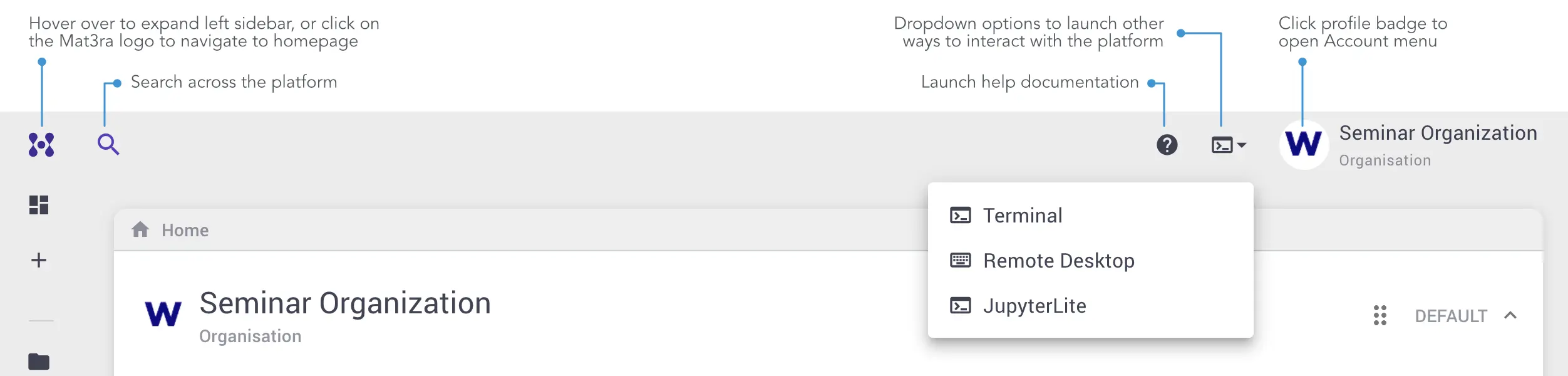
The appearance and functionality of the header bar is illustrated below.
Left-hand Sidebar Trigger
The left-hand sidebar can be activated by clicking the top left corner anchor , or alternatively through the toggle slider towards the right-end of the header.
Link to Homepage
Navigate back to the homepage of the account by clicking the main company logo.
Previous Page Trigger
The user can revert to the previous screen using the back arrow, similarly to internet browsers.
Page Name
The title of the page currently viewed is shown for reference purposes.
Right-hand Sidebar Trigger
The right-hand sidebar can be opened by clicking the Account Badge at the top-right corner of the page.
Terminal and Remote Desktop
The Terminal and Remote Desktop functionality provide alternative methods for accessing Accounts. More information about such practices can be retrieved here.
Footer
Additional links can be accessed from within the footer: the homepage of Mat3ra.com, the present documentation, and relevant information about our privacy conditions and Terms of Service.